24 Feb 2026
In a world where legal professionals juggle client data, sensitive documents, deadlines and billable hours, case management software for law firms has become an essential tool for efficiency and practice growth. The importance of incorporating technology in law firms is clear. Reports show a significant market growth in case management software, which is expected to increase from $1.724 billion in 2021 to $4.0193 billion by 2028. This significant growth not only emphasizes the software’s role in boosting productivity but also underscores its vital contribution to maintaining a competitive edge in the legal industry.
To aid you in your quest to find the best law firm software, we’ve compiled this comprehensive guide. We’ll explore what to look for, must-have features, and even setting up your case management software. More importantly, we’ll guide you on how to customize these systems to fit the unique needs of your firm’s work and meet your client’s expectations.
This is where case management software for law firms comes into play. Advanced tools have made it possible to organize legal work in one place to help firms streamline their processes, collaborate, and provide better client services.
1. What is case management software for law firms?
Case management software is a digital platform designed to help law firms organize, track, and manage every aspect of their cases in one place. From client intake to case closure, it acts as a centralized hub for documents, communications, tasks, and timelines.
Instead of juggling spreadsheets, emails, and paper files, lawyers can access real-time case information instantly, enabling faster decision-making and more efficient workflows. Research and industry reports show the legal case management market is rapidly growing, highlighting its increasing importance in modern legal practice.
2. Why law firms are adopting case management software
Law firms adopt these tools primarily to improve efficiency and maintain competitiveness. With increasing administrative demands, automation allows lawyers to focus more on strategy and client relationships rather than repetitive tasks.Theo delivers highly customizable, enterprise-grade software tailored for the scale and complexity of large organizations.
Key reasons firms invest in case management software include
-
Better organization of case files and data
-
Reduced administrative workload
-
Improved billing accuracy
-
Enhanced client communication
-
Stronger compliance and data security
3. Core feature every law firm should look for
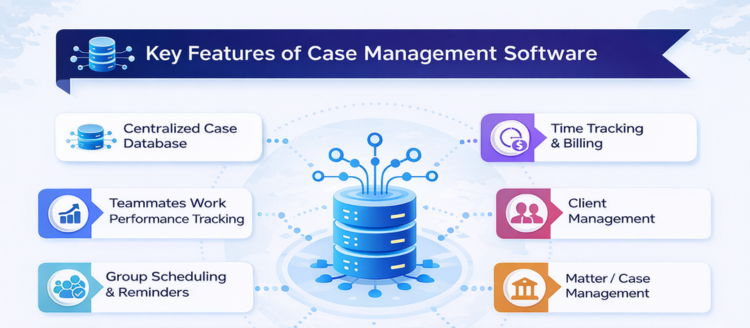
Centralized case database
A core function of any legal case management system is storing all case information, client details, notes, documents, and deadlines in one secure location. This ensures quick access and reduces the risk of missing critical information.
Time tracking and billing
Manual time tracking can be exhausting and honestly, very easy to mess up. Automated timers and billing features help lawyers record billable hours accurately and generate invoices efficiently, improving revenue capture and transparency. Unlike typical case management software, legal case management software helps with the most detailed aspects of attorney work; for example, tracking billable hours or onboarding new clients and rather than simply storing data on your caseload, the right software helps you organize and categorize your caseload in a variety of ways.
Billing can be initiated once work entries and expenses are approved. The system generates a temporary invoice that goes through approval stages before finance converts it into a final invoice, ensuring accuracy and controlled billing workflows. Theo supports flexible billing models - including fixed-fee, retainership, hourly, event-based, and specialized trademark and IP/IPR Billing - ensuring accurate and seamless invoicing for every engagement.
Client Management
This module allows firms to create and manage detailed client profiles through add or search options. It stores essential information such as contact details, client type (business, non-business, export, SEZ), billing branch, and GST details.
Billing configurations like hourly rates, activity-based fees, currencies, and bank charges for offshore clients can be defined at the client level. Multiple contact persons can be added, with one designated as the authorized signatory whose details appear on invoices. Communication preferences can also be set to send case updates and reminders via email or SMS.
Matter / Case Management
This feature captures comprehensive matter details, including client association, matter type (litigation, corporate, taxation, IPR, etc.), industry classification, and team allocation.
Firms can define billing types such as hourly, lump sum, retainership, or fixed cost, along with resource allocation and hour limits that trigger alerts when exceeded. Documents can be uploaded or linked through cloud storage, and matters can be tracked from creation to closure with status updates.
Daily Work Recording & Validation
Users can record their daily work by entering client, matter, work type, and duration along with narration that is reflected in billing. The system calculates billable time while allowing adjustments for actual productive hours.
Entries are routed to team leads or reporting managers for approval before becoming billable. The module also supports document uploads, expense claims during entry, and capturing next appearance dates for litigation matters.
Expense Management
This module enables recording of expenses at both client and matter levels under various expense heads. Expenses can be marked billable or non-billable and routed through approval workflows before being included in billing or reimbursements, ensuring accurate financial tracking.
Regulatory and Statutory Expenses
Firms can track statutory payments and compliance-related costs such as government fees within matters. Maintaining these records helps ensure proper documentation, improves financial transparency, and supports audit readiness.
Document Management & Sharing
Documents can be uploaded during matter creation or updates and organized case-wise for easy retrieval. When shared externally, documents are sent through secure links that require approval and can expire after a defined period, ensuring controlled access and confidentiality.
Court Diary
This feature maintains hearing schedules using next appearance dates and automated reminders. Notifications can be sent to team members and optionally to clients, helping ensure no important court dates are missed while improving scheduling efficiency.
Group Scheduling & Reminders
Teams can create tasks, assign them to members, set priorities and deadlines, and track progress statuses such as pending or completed. Calendar views and reminders help improve coordination and ensure timely follow-ups.
Teammates Work Performance Tracking
The system analyzes time utilization and output efficiency by categorizing work into productive and non-productive efforts and tracking billing hours. These insights help management monitor performance, improve accountability, and optimize resource allocation.
4. Additional features that add real value
Beyond the basics, modern software often includes advanced capabilities such as:
Automated alerts and workflow automation
-
Role-based security and encryption
-
Customizable dashboards for different practice areas
-
Cloud access and mobile apps
-
Integrations with email, accounting, and document tools
These features ensure the software adapts to a firm’s unique processes rather than forcing firms to change how they work.
5. Benefits of using case management software
Increased efficiency
Automation reduces repetitive administrative tasks, saving hours each week and allowing lawyers to focus on billable work.
Better collaboration
Teams can share updates, documents, and notes in real time, improving coordination across cases.
Improved accuracy
Centralized data reduces duplication and minimizes human errors in billing, documentation, and scheduling.
Enhanced client experience
Faster responses, transparent communication, and organized workflows lead to higher client satisfaction.
Scalability for growth
As firms grow, case management systems provide the infrastructure needed to handle more clients and complex cases without operational chaos.
6. How to implement case management software successfully

Creating an efficient case management system using software involves a series of strategic steps. The below guide outlines a practical approach to setting up a software-based case management system tailored to the unique needs of your law firm.
Start with clear goals and must-have features
Before choosing or configuring any software, take time to understand what you want to achieve. Are you trying to reduce admin work, improve billing accuracy, or enhance client communication?
Speak with partners, associates, and support staff to gather their input. This helps you identify the features that will genuinely make a difference in daily operations.
Map out your typical case journey
Every law firm handles cases differently. Break down your usual case flow from client intake and document collection to hearings and final closure.
Once you understand each stage, align the software’s tools and workflows to match that journey. This ensures the system supports your process instead of forcing you to adapt to it.
Clean and review your existing data
Before moving your data into the new system, it’s important to tidy things up. Remove duplicate entries, update outdated information, and fix inconsistencies.
Starting with clean data not only improves accuracy but also makes the transition smoother and easier to manage.
Customize the System to fit your practice
No two firms operate exactly the same way, so customization is key.
For example, a real estate practice may need property-specific fields, while a litigation firm might require detailed case stage tracking. Work with your software provider to tailor the system so it reflects your firm’s workflows and priorities.
Plan a smooth data migration
Moving data into a new platform can feel daunting, but with proper planning it can be straightforward.
Set a clear migration timeline, back up your data, and test small batches before transferring everything. A structured approach minimizes downtime and ensures nothing important is lost in the process.
Connect It with your existing tools
Your case management software shouldn’t operate in isolation. Integrate it with tools your firm already relies on, such as email platforms, document storage, accounting systems, or scheduling apps.
These integrations create a seamless workflow and eliminate the need to switch constantly between systems.
Test With real-world scenarios
Before rolling it out fully, test the system using real case situations like drafting documents, scheduling hearings, or tracking tasks.
Involve team members from different roles since each will interact with the software differently. Their feedback helps you fine-tune the setup.
Train your team thoroughly
Even the best software won’t deliver results if people don’t know how to use it. Provide hands-on training sessions, guides, and ongoing support so everyone feels comfortable and confident.
When your team understands the system, adoption becomes much smoother and the benefits appear faster.
A structured approach ensures maximum ROI and faster adoption across the firm.
7. Ready to simplify your case management with Theo?
Switching to a new case management system can feel like a big change, but the impact is usually clear once everything is in place. With Theo, firms can bring cases, documents, and daily tasks into one organized space, reducing the time spent on admin and giving teams better control over their workflow.
Whether you’re upgrading from an older setup or starting fresh, the move is really about working more efficiently and creating smoother processes, an investment that supports both productivity and long-term growth. Theo provides Cloud-based enterprise solution for both legal firms and corporate legal departments.
FAQs
Case management software for lawyers is a digital tool that helps law firms organize cases, manage documents, track deadlines, handle billing, and communicate with clients all from one centralized platform.
Law firms use it to reduce administrative workload, improve organization, avoid missed deadlines, and streamline billing and communication. It helps teams work more efficiently and deliver better client service.
Key features include document management, time tracking and billing, task and calendar management, client communication tools, reporting dashboards, and strong security controls.
Yes. Solo practitioners benefit greatly because it helps them stay organized, automate routine tasks, and manage cases without needing a large support team.
Pricing varies depending on features and firm size. Most providers offer monthly subscription plans per user, with costs increasing for advanced automation, integrations, or enterprise features.